NotificationsPage
SMS notification management page with live updates and integrated editor
NotificationsPage
A complete SMS notification scheduling page with table display, live updates, and integrated drawer editor with iPhone preview.
Features
- Notifications Table: Full-featured table with filtering and sorting
- Live Updates: Auto-refresh every 5 seconds using
useLiveUpdates - Create Notification: "Create Notification" button opens full-screen drawer
- iPhone Preview: Real-time preview of notification appearance
- Send Now or Later: Schedule for immediate or future delivery
- Passenger Filtering: Filter by passengers and projects
- Localization: Fully localized in English and Japanese
Usage
// app/notifications/page.tsx
import { NotificationsPage } from '@/components/sgerp/pages/notifications-page';

export default function Page() {
  return <NotificationsPage />;
}
Props
This component does not accept any props. It's a standalone page component.
Screenshots
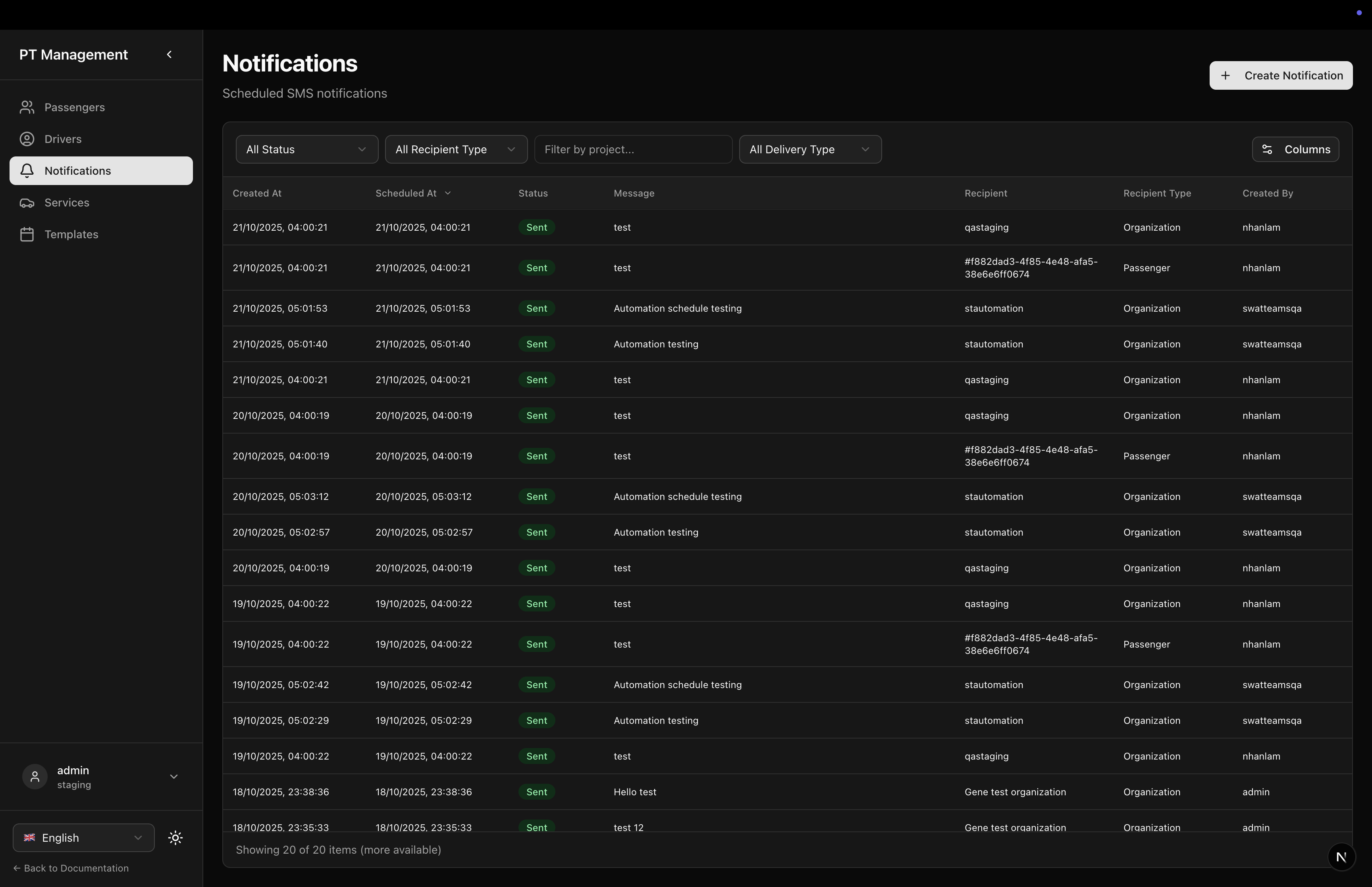
Notifications Table
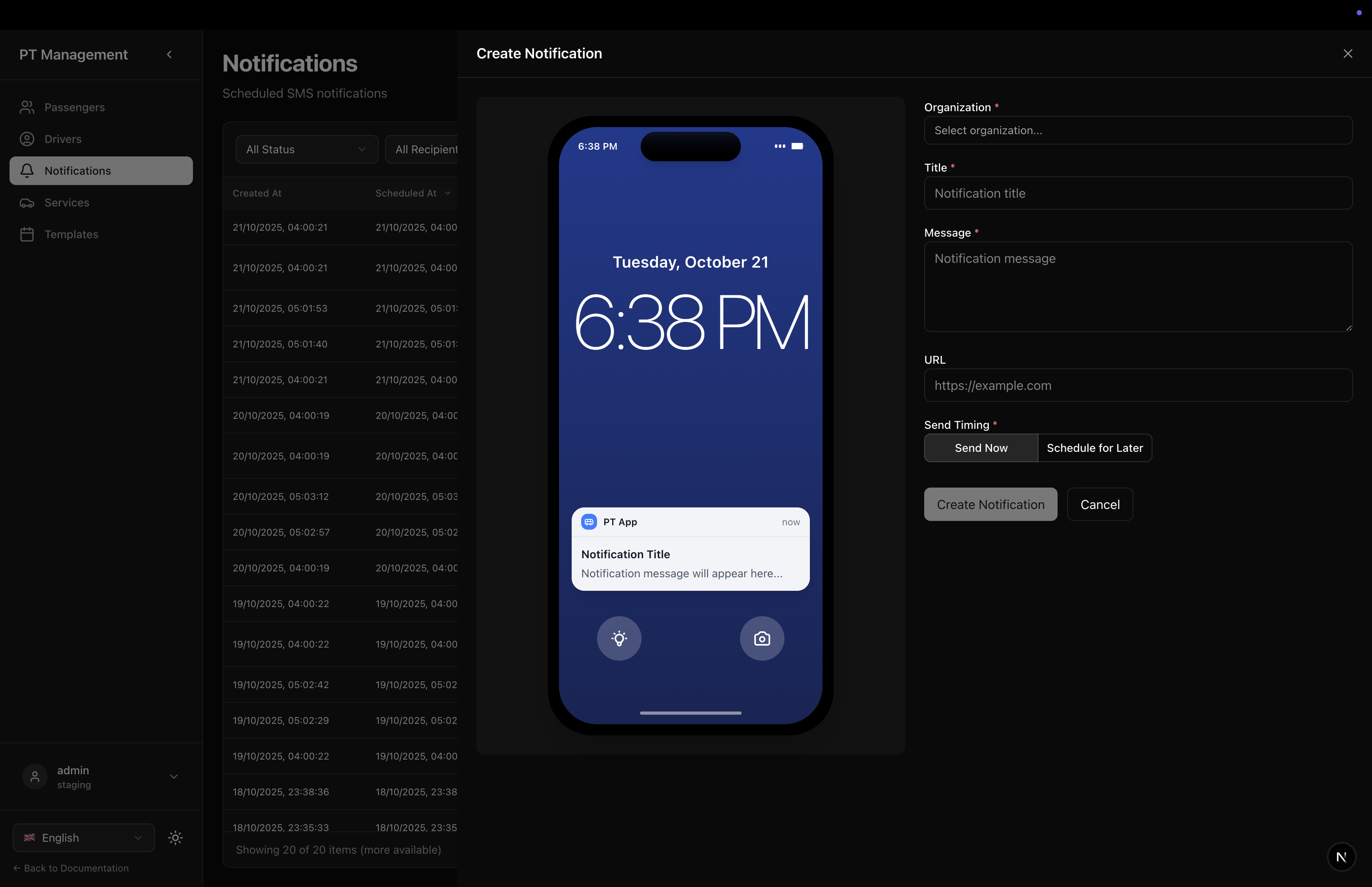
Create Notification
Features in Detail
Header Section
- Title: Localized page title (
ptapp.notifications.title) - Description: Localized description (
ptapp.notifications.description) - Create Button: Opens full-screen drawer for new notification
Notifications Table
- Full Table: Uses
SMSScheduledTablefrom predefined tables - Full Height: Table fills available vertical space
- Live Updates: Refreshes every 5 seconds
- Status Filter: Filter by sent, pending, scheduled
- Passenger Filter: Filter by specific passengers
- Project Filter: Filter by project
Notification Drawer
- Full-Screen Layout: Backdrop with large drawer
- Integrated Preview: Built-in iPhone preview with real-time updates
- Send Options:
- Send Now: Immediate delivery
- Schedule: Pick date and time
- Recipient Selection: Choose passengers and projects
- Optimized Performance: Uses uncontrolled inputs and refs for smooth typing
Table Columns
- ID: Notification ID
- Title: Notification title
- Body: Message body (truncated)
- Recipients: Passenger count
- Status: Sent/Pending/Scheduled
- Scheduled At: Scheduled delivery time
- Sent At: Actual send time
- Created: Creation timestamp
Live Updates
The component uses useLiveUpdates hook:
useLiveUpdates(api?.collections.smsscheduled ?? null, {
  interval: 5000,      // Update every 5 seconds
  enabled: true,       // Always enabled
  useGte: true,        // Backend requires __gte
  onUpdate: (hasUpdates) => {
    if (hasUpdates) {
      console.log('Notifications updated');
    }
  },
});
Layout Structure
<div className="flex-1 flex flex-col gap-6 min-h-0">
  {/* Header with Create Button */}
  <div className="flex items-center justify-between flex-shrink-0">
    <div>
      <h1>{getText('ptapp.notifications.title')}</h1>
      <p>{getText('ptapp.notifications.description')}</p>
    </div>
    <Button onClick={() => setDrawerOpen(true)}>
      <Plus /> {getText('notification.create_button')}
    </Button>
  </div>

  {/* Table */}
  <div className="flex-1 min-h-0 flex flex-col">
    <SMSScheduledTable
      collection={api?.collections.smsscheduled ?? null}
      fullscreenHeight
    />
  </div>
</div>

{/* Full-Screen Drawer */}
{drawerOpen && (
  <div className="fixed inset-0 z-50 overflow-hidden">
    <div className="absolute inset-0 bg-black/50" onClick={handleCancel} />
    <div className="absolute right-0 top-0 h-full w-full max-w-6xl bg-background">
      <NotificationDrawer
        api={api}
        showPreview={true}
        onSuccess={handleSuccess}
        onCancel={handleCancel}
      />
    </div>
  </div>
)}
State Management
The component manages:
drawerOpen: Whether drawer is visible
The NotificationDrawer component internally manages all form state and preview updates using optimized refs and uncontrolled inputs for best performance.
Interaction Flow
Creating a Notification
- Click "Create Notification" button
- Full-screen drawer opens with integrated form and iPhone preview
- Type title and body - preview updates in real-time via refs (no re-renders)
- Choose "Send Now" or "Schedule for later"
- If scheduling, pick date and time
- Select organization recipient
- Click "Send Notification" or "Schedule Notification"
- Drawer closes, table refreshes with new notification
- Live updates continue showing status changes (e.g., scheduled → sent)
Localization
Uses localization keys:
ptapp.notifications.title- Page titleptapp.notifications.description- Page descriptionnotification.create_button- Create button text
Plus all keys from SMSScheduledTable and NotificationDrawer components.
Related Components
- SMSScheduledTable - The table component
- NotificationDrawer - The drawer editor with integrated iPhone preview
Dependencies
react(for useState)lucide-react(for Plus icon)sgerp-frontend-lib(collections, hooks, tables, drawer, live updates)@/components/ui/button(shadcn/ui)
Notes
- SGERP Context: Requires
SGERPProviderwrapper - Collection: Uses
smsscheduledcollection from SGERP client - Live Updates: Uses
__gteparameter for backend compatibility, always updates on new data (ignores modified_at) - Full-Screen: Drawer takes full screen (max-w-6xl) for better preview
- Performance Optimized: Uses uncontrolled inputs and direct DOM manipulation via refs for smooth typing with no re-renders
- Real-Time Preview: iPhone preview updates instantly as you type using refs