PassengerDetailPage
Passenger detail page with bookings, transactions, and unmask functionality
PassengerDetailPage
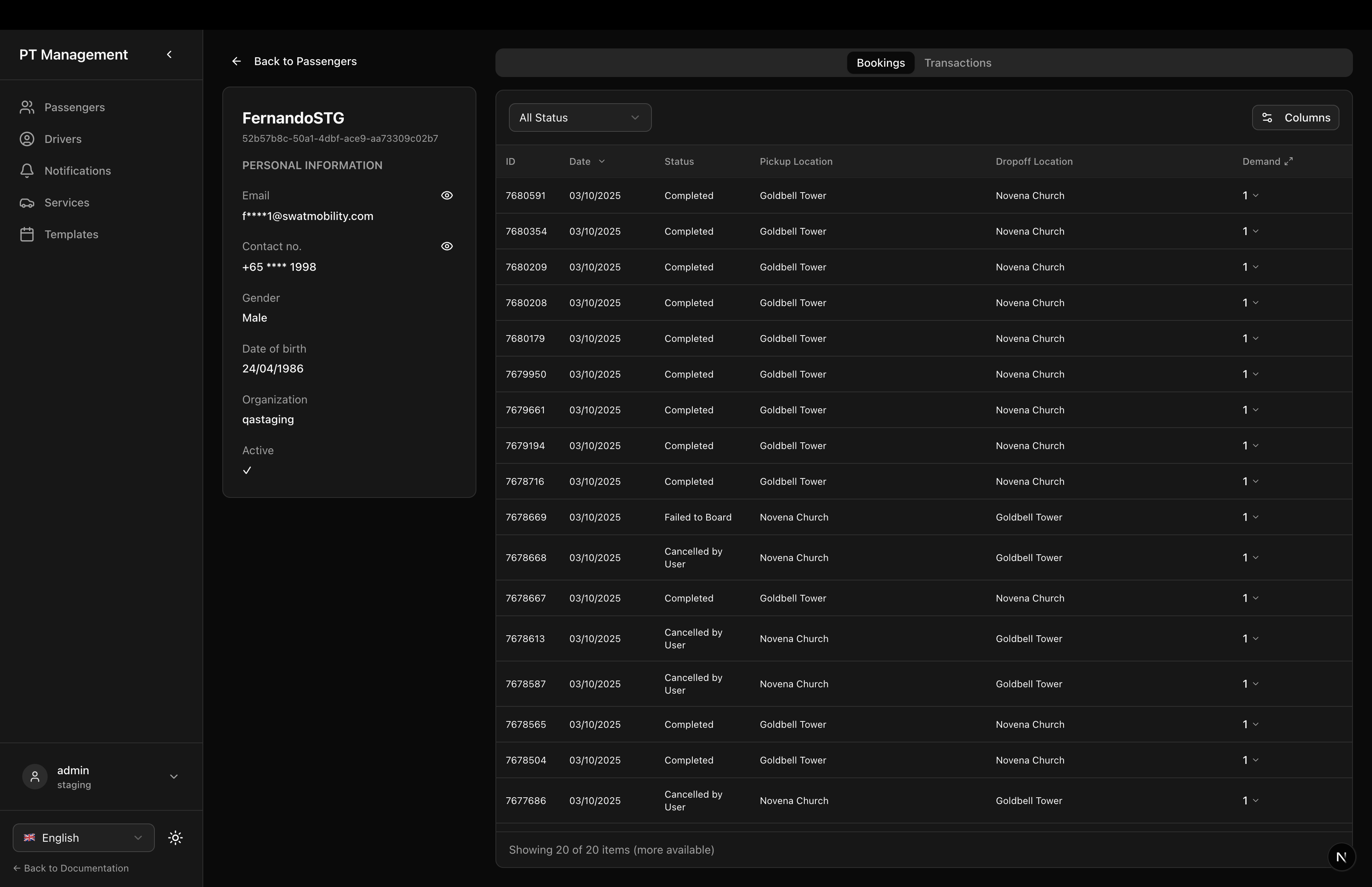
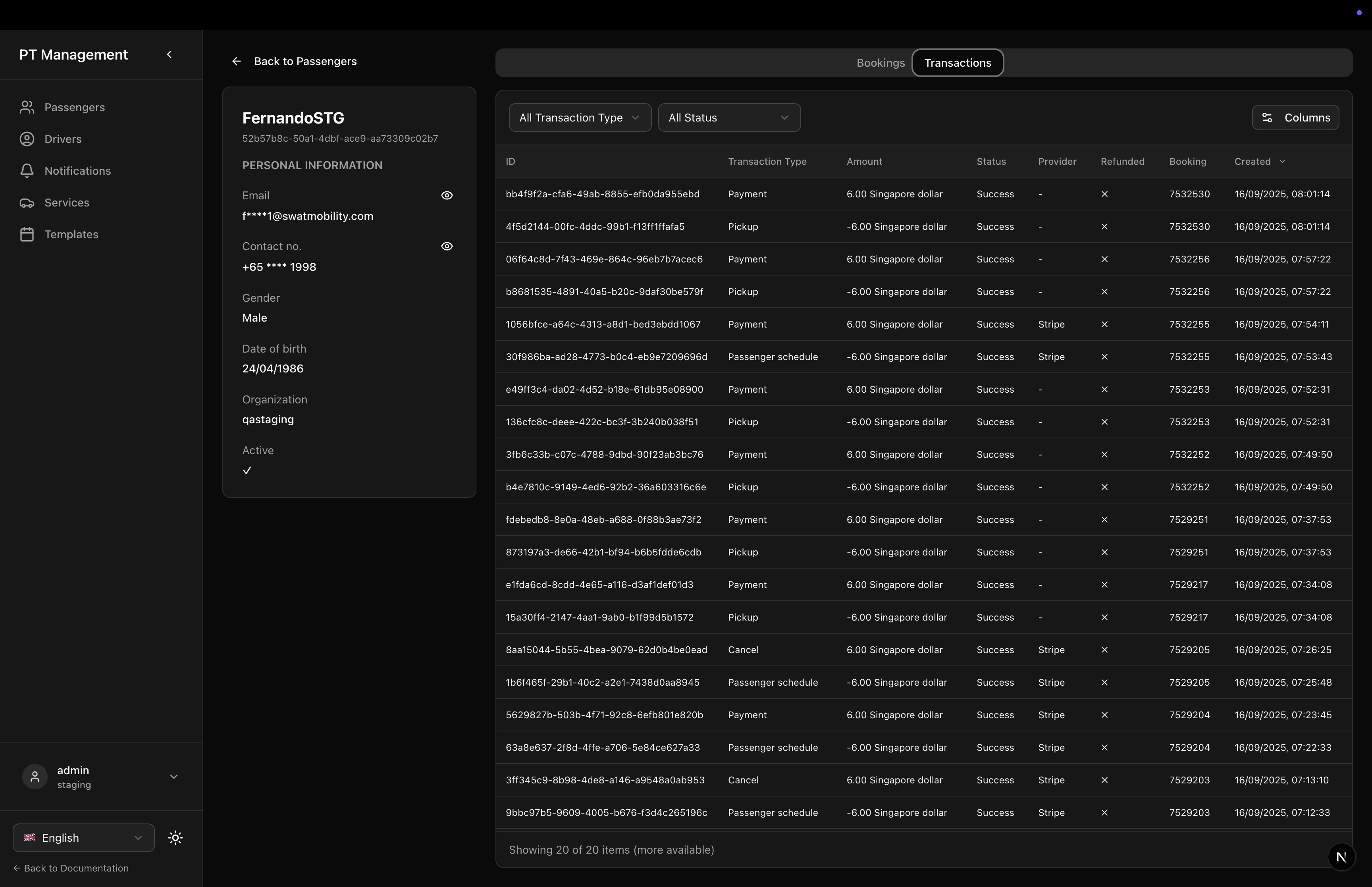
A comprehensive passenger detail page showing personal information, booking history, and transaction history. Includes secure unmask functionality for email and phone.
Features
- Personal Information: Full passenger details with unmask capability
- Bookings Tab: Complete booking history with filtering and sorting
- Transactions Tab: Payment transaction history
- Unmask Email/Phone: Secure one-time unmask with eye icons
- Back Navigation: Navigate back to passenger list
- Localization: Fully localized in English and Japanese
- Tab Layout: Organized tabs for bookings and transactions
Usage
// app/passengers/[id]/page.tsx
'use client'

import { useParams } from 'next/navigation';
import { PassengerDetailPage } from '@/components/sgerp/pages/passenger-detail-page';

export default function Page() {
  const params = useParams();
  const passengerId = params.id as string;

  return <PassengerDetailPage passengerId={passengerId} />;
}
Props
| Prop | Type | Default | Required | Description |
|---|---|---|---|---|
passengerId | string | - | Yes | The ID of the passenger to display |
Screenshots
Bookings Tab
Transactions Tab
Features in Detail
Left Sidebar - Personal Information
- Name: Passenger full name
- ID: Passenger ID (small muted text)
- Email: Email with unmask button
- Masked by default
- Click eye icon to unmask
- Shows spinner while loading
- Click eye-off to re-mask
- Phone: Phone with unmask button
- Same behavior as email
- Gender: Male/Female/Other (localized)
- Date of Birth: Formatted date
- Organization: Organization name
- Active: Active status (✓/✗)
- Back Button: Navigate to passenger list
Right Area - Tabs
Bookings Tab
- Full Table: Shows all bookings for this passenger
- Columns:
- ID
- Date (creation date)
- Status (localized booking state)
- Pickup Location
- Dropoff Location
- Demand (passenger count + special requirements)
- Filters:
- Status filter (dropdown)
- Combined "All Cancelled" option
- Sorting: Sort by ID, date, status, pickup time
- Full Height: Table fills available space
Transactions Tab
- Full Table: Shows all payment transactions
- Columns:
- ID
- Date
- Type (Payment/Refund)
- Amount (currency formatted)
- Status
- Payment Method
- Filtering: Filter by type, status
- Sorting: Sort by date, amount
- Full Height: Table fills available space
Unmask Functionality
The unmask feature uses secure API endpoints:
const unmaskEmail = async () => {
  setUnmaskingEmail(true);
  try {
    const response = await APIClient.post(
      `/api/v2/passenger/${passengerId}/unmask_email`,
      {}
    );
    if (response.data?.email) {
      setUnmaskedEmail(response.data.email);
    }
  } catch (error) {
    console.error('Failed to unmask email:', error);
  } finally {
    setUnmaskingEmail(false);
  }
};
Security Notes:
- Each unmask is a separate API call
- Unmasked data stored in component state only
- Re-masking clears the unmasked data
- No persistence - refreshing page re-masks
Layout Structure
<div className="flex-1 flex gap-6 min-h-0">
  {/* Left Sidebar */}
  <div className="w-80 flex-shrink-0">
    <Button onClick={() => router.push('/ptapp')}>
      <ArrowLeft /> {getText('ptapp.passengers.back_to_list')}
    </Button>

    <div className="border rounded-lg p-6 bg-card">
      <h2>{passenger.name}</h2>
      <p className="text-muted-foreground">{passenger.id}</p>

      {/* Personal info fields with unmask buttons */}
    </div>
  </div>

  {/* Right Content Area */}
  <div className="flex-1 min-h-0 flex flex-col">
    <Tabs defaultValue="bookings">
      <TabsList>
        <TabsTrigger value="bookings">Bookings</TabsTrigger>
        <TabsTrigger value="transactions">Transactions</TabsTrigger>
      </TabsList>

      <TabsContent value="bookings">
        <DemandProvider>
          <SGERPTable
            collection={api?.collections.booking ?? null}
            columns={bookingColumns}
            filters={bookingFilters}
            defaultFilters={{ customer_id: passengerId }}
            initialOrderBy="-created_at"
            fullscreenHeight
            skipInitialFetch={false}
          />
        </DemandProvider>
      </TabsContent>

      <TabsContent value="transactions">
        <TransactionTable
          collection={api?.collections.transaction ?? null}
          columns={transactionColumns}
          defaultFilters={{ passenger_id: passengerId }}
          fullscreenHeight
          skipInitialFetch={false}
        />
      </TabsContent>
    </Tabs>
  </div>
</div>
State Management
The component manages:
passenger: The passenger objectloading: Loading stateunmaskedEmail: Unmasked email valueunmaskedPhone: Unmasked phone valueunmaskingEmail: Loading state for email unmaskunmaskingPhone: Loading state for phone unmask
Loading States
Initial Load
Shows "Loading..." text while fetching passenger data
Unmask Loading
Shows spinner icon while unmasking email/phone
No Data
Shows "No data" message with back button if passenger not found
Booking Status Filter
The bookings table includes a special "All Cancelled" filter:
{
  value: 'cancelled_by_user,cancelled_in_calc',
  label: getText('booking_state.all_cancelled')
}
This combines multiple cancelled states into one filter option.
Transaction Columns Customization
The passenger column is removed from transaction table since we're already viewing a specific passenger:
const transactionColumns = useMemo(
  () => getDefaultTransactionColumns(getText).filter(
    col => col.key !== 'passenger_id'
  ),
  [getText]
);
Localization
Uses localization keys:
ptapp.passengers.back_to_list- Back buttonptapp.passengers.personal_info- Section headerptapp.passengers.contact_no- Phone labelptapp.passengers.gender- Gender labelptapp.passengers.date_of_birth- DOB labelptapp.passengers.bookings- Bookings tabptapp.passengers.transactions- Transactions tabcolumn.email,column.active, etc.gender.male,gender.female,gender.otherbooking_state.*- All booking statescommon.loading,common.no_data
Related Components
- PassengersPage - List page
- PassengerTable - Table component
- TransactionTable - Transaction table
DemandCell- Demand display component
Dependencies
react(for useState, useEffect, useMemo)next(for useRouter)lucide-react(for ArrowLeft, Eye, EyeOff icons)sgerp-frontend-lib(collections, hooks, tables, API client)@/components/ui/button,@/components/ui/tabs,@/components/ui/spinner(shadcn/ui)
Notes
- SGERP Context: Requires
SGERPProviderwrapper - Collections: Uses
passenger,booking, andtransactioncollections - Router: Uses Next.js
useRouterfor back navigation - Security: Unmask API calls are authenticated
- Privacy: Default state is masked, unmask is temporary
- Collection Check: Checks collection first before fetching by ID
- Skip Initial Fetch: Set to
falsefor booking/transaction tables to ensure data loads