PassengersPage
Passenger management page with table and CSV import functionality
PassengersPage
A complete passenger management page with table display, CSV import, and navigation to passenger details. Includes organization filtering and full list refresh logic.
Features
- Passenger Table: Full-featured table with organization filtering
- Import Passengers: CSV import with validation and error handling
- Row Click Navigation: Click row to view passenger details
- Full List Refresh: Ensures full list when landing on page
- Localization: Fully localized in English and Japanese
- Full Height: Table expands to fill available space
Usage
// app/passengers/page.tsx (or app/page.tsx for root)
import { PassengersPage } from '@/components/sgerp/pages/passengers-page';

export default function Page() {
  return <PassengersPage />;
}
Props
This component does not accept any props. It's a standalone page component.
Screenshot
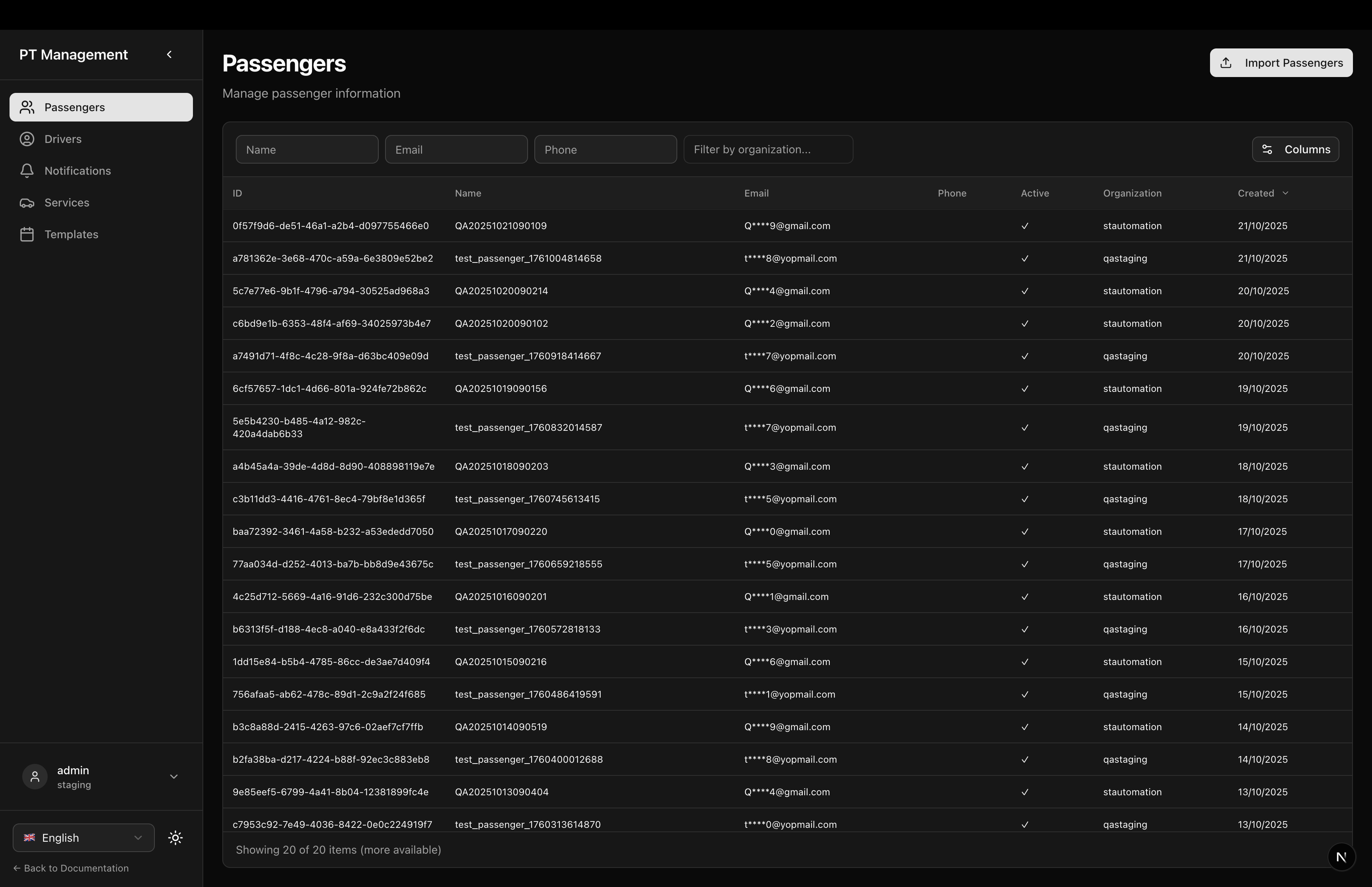
Features in Detail
Header Section
- Title: Localized page title (
ptapp.passengers.title) - Description: Localized description (
ptapp.passengers.description) - Import Button: Opens CSV import dialog
Passenger Table
- Full Table: Uses
PassengerTablefrom predefined tables - Full Height: Table fills available vertical space
- Row Click: Navigates to passenger detail page
- Organization Filter: Filter passengers by organization
- Active Filter: Show active/inactive passengers
Import Dialog
- CSV Upload: Drag & drop or click to upload
- Validation: Checks for required fields
- Error Display: Shows validation errors
- Success: Refreshes table after import
Full List Refresh Logic
When landing on the page, if collection has only 1 item (likely from a filter on detail page), it automatically refetches the full list:
useEffect(() => {
  const ensureFullList = async () => {
    if (!api?.collections.passenger) return;

    // If collection has only 1 item, it was likely filtered - refetch all
    if (api.collections.passenger.length <= 1) {
      await api.collections.passenger.fetch({ limit: 20 });
    }
  };

  ensureFullList();
}, [api]);
Table Columns
- ID: Passenger ID
- Name: Full name
- Email: Email address (masked)
- Phone: Phone number (masked)
- Gender: Gender (Male/Female/Other)
- Date of Birth: Birth date
- Organization: Organization name
- Active: Active status indicator
Navigation
Clicking a passenger row navigates to:
/ptapp/passengers/{passengerId}
This opens the PassengerDetailPage with full booking and transaction history.
Layout Structure
<div className="flex-1 flex flex-col gap-6 min-h-0">
  {/* Header with Import Button */}
  <div className="flex-shrink-0 flex items-start justify-between">
    <div>
      <h1>{getText('ptapp.passengers.title')}</h1>
      <p>{getText('ptapp.passengers.description')}</p>
    </div>
    <Button onClick={() => setImportDialogOpen(true)}>
      <Upload /> {getText('import.passengers.button')}
    </Button>
  </div>

  {/* Table */}
  <div className="flex-1 min-h-0 flex flex-col">
    <PassengerTable
      collection={api?.collections.passenger ?? null}
      fullscreenHeight
      onRowClick={(passenger) => router.push(`/ptapp/passengers/${passenger.id}`)}
    />
  </div>

  {/* Import Dialog */}
  <ImportPassengersDialog
    open={importDialogOpen}
    onOpenChange={setImportDialogOpen}
    onSuccess={handleImportSuccess}
  />
</div>
Interaction Flow
Viewing Passenger Details
- Click passenger row in table
- Navigate to
/ptapp/passengers/{id} - View bookings and transactions
- Click back to return to list
- Full list is restored (not filtered)
Importing Passengers
- Click "Import Passengers" button
- Dialog opens
- Upload CSV file
- Validation runs
- If valid, passengers created
- Table refreshes with new data
- Dialog closes
CSV Import Format
Expected CSV columns:
name(required)email(required)phonegenderbirth_dateorganization_idis_active
Localization
Uses localization keys:
ptapp.passengers.title- Page titleptapp.passengers.description- Page descriptionimport.passengers.button- Import button text
Plus all keys from PassengerTable and ImportPassengersDialog components.
Related Components
- PassengerTable - The table component
- PassengerDetailPage - Detail page
ImportPassengersDialog- Import dialog component
Dependencies
react(for useState, useEffect)next(for useRouter)lucide-react(for Upload icon)sgerp-frontend-lib(collections, hooks, tables, dialog)@/components/ui/button(shadcn/ui)
Notes
- SGERP Context: Requires
SGERPProviderwrapper - Collection: Uses
passengercollection from SGERP client - Router: Uses Next.js
useRouterfor navigation - Refresh Logic: Ensures clean state when navigating from detail to list
- Privacy: Email and phone masked by default (use detail page to unmask)