ServicesPage
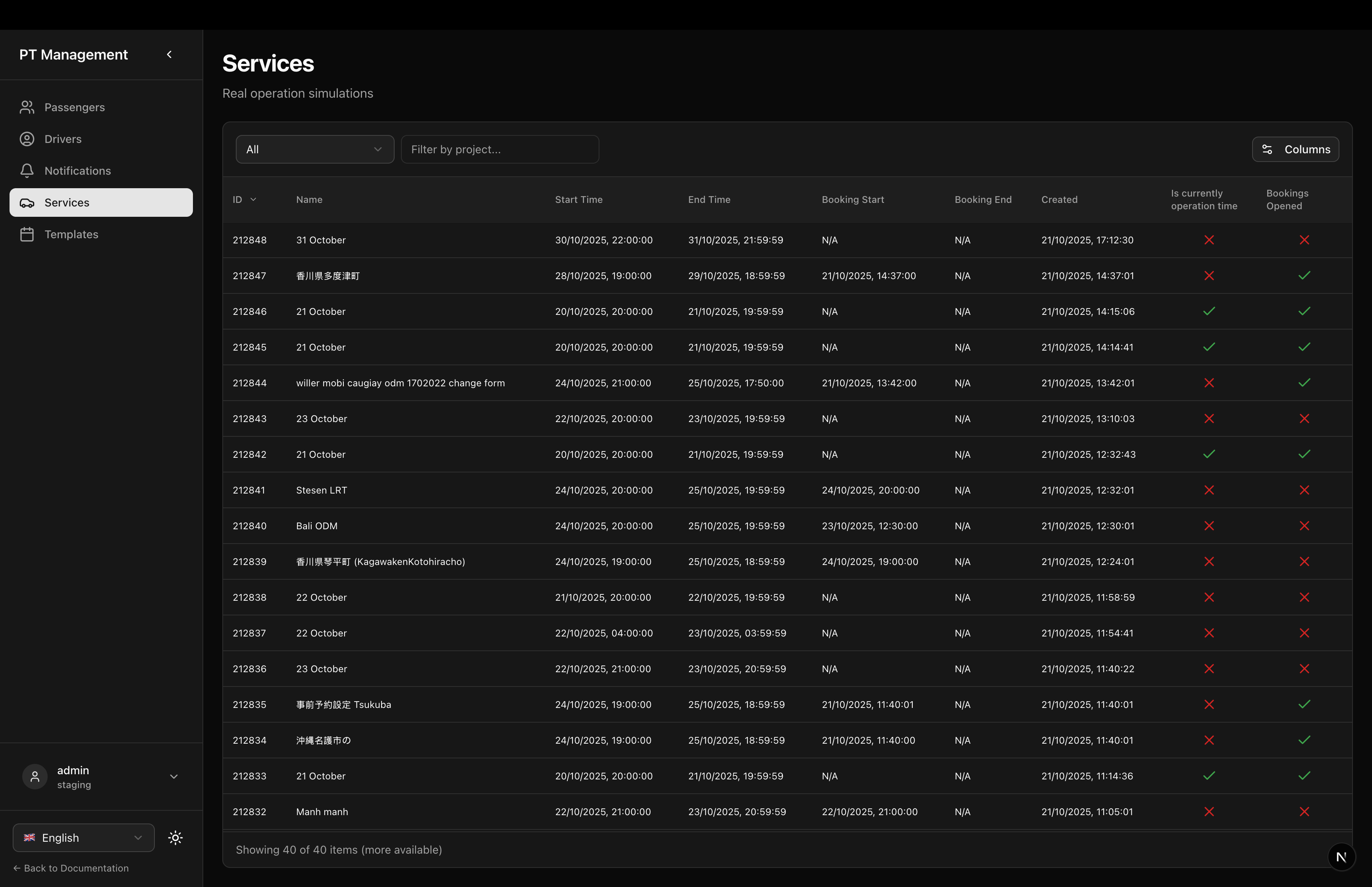
Services list page for managing real operation simulations
ServicesPage
A ready-to-use page component for displaying and managing real operation simulations (services). Includes navigation to simulation details.
Features
- Services Table: Full-featured table with filtering and sorting
- Row Click Navigation: Click any simulation to view details
- Localization: Fully localized in English and Japanese
- Full Height: Table expands to fill available space
- Activity Filters: Current, Future, Past, Booking Started filters
Usage
// app/services/page.tsx
import { ServicesPage } from '@/components/sgerp/pages/services-page';

export default function Page() {
  return <ServicesPage />;
}
Props
This component does not accept any props. It's a standalone page component.
Screenshot
Features in Detail
Header Section
- Title: Localized page title (
ptapp.services.title) - Description: Localized description (
ptapp.services.description)
Services Table
- Full Table: Uses
ServicesTablefrom predefined tables - Full Height: Table fills available vertical space
- Row Click: Navigates to
/ptapp/simulations/{id}on row click - Activity Filters: Filter by Current, Future, Past, or Booking Started
- Project Filter: Filter by project using autocomplete
- Date Filters: Filter by start date, end date
- Search: Search by simulation name
Table Columns
- ID: Simulation ID
- Name: Simulation name
- Status: Simulation status badge
- Project: Project name
- Activity: Activity period
- Start Date: Start date/time
- End Date: End date/time
- Passengers: Passenger count
- Drivers: Driver count
- Created: Creation timestamp
Navigation
Clicking a simulation row navigates to:
/ptapp/simulations/{simulationId}
This opens the SimulationDetailPage with full route visualization and booking management.
Layout Structure
<div className="flex-1 flex flex-col gap-6 min-h-0">
  {/* Header */}
  <div className="flex-shrink-0">
    <h1>{getText('ptapp.services.title')}</h1>
    <p>{getText('ptapp.services.description')}</p>
  </div>

  {/* Table */}
  <div className="flex-1 min-h-0 flex flex-col">
    <ServicesTable
      collection={api?.collections.simulation ?? null}
      fullscreenHeight
      onRowClick={handleRowClick}
    />
  </div>
</div>
Localization
Uses localization keys:
ptapp.services.title- Page titleptapp.services.description- Page description
Plus all keys from ServicesTable component.
Related Components
- ServicesTable - The table component
- SimulationDetailPage - Detail page
- TemplatesPage - Similar page for templates
- SimulationTable - Base table component
Dependencies
next(for routing)reactsgerp-frontend-lib(collections, hooks, tables)
Notes
- SGERP Context: Requires
SGERPProviderwrapper - Router: Uses Next.js
useRouterfor navigation - Collection: Uses
simulationcollection from SGERP client - Default Filters: No default filters applied (shows all services)