SimulationDetailPage
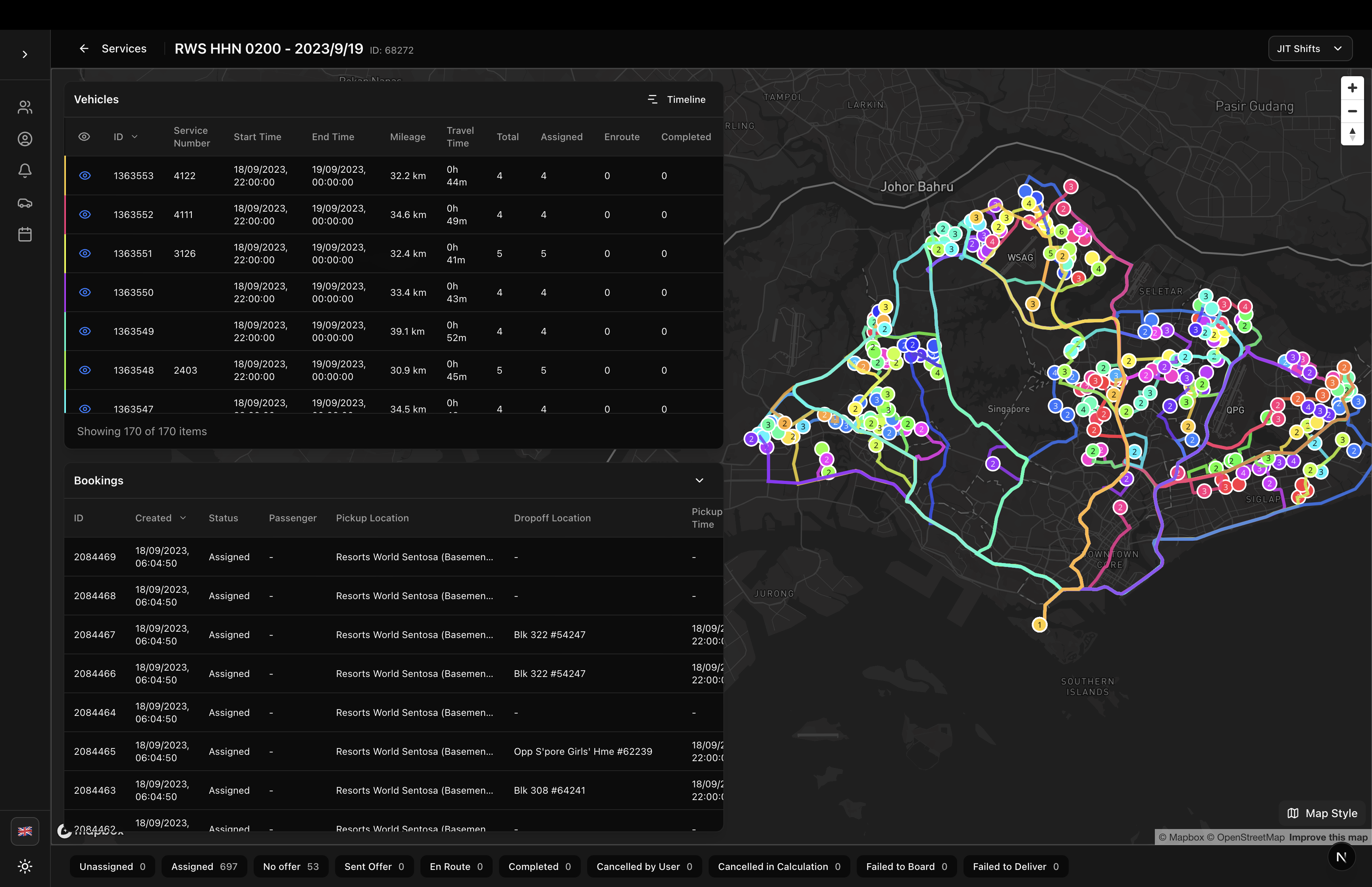
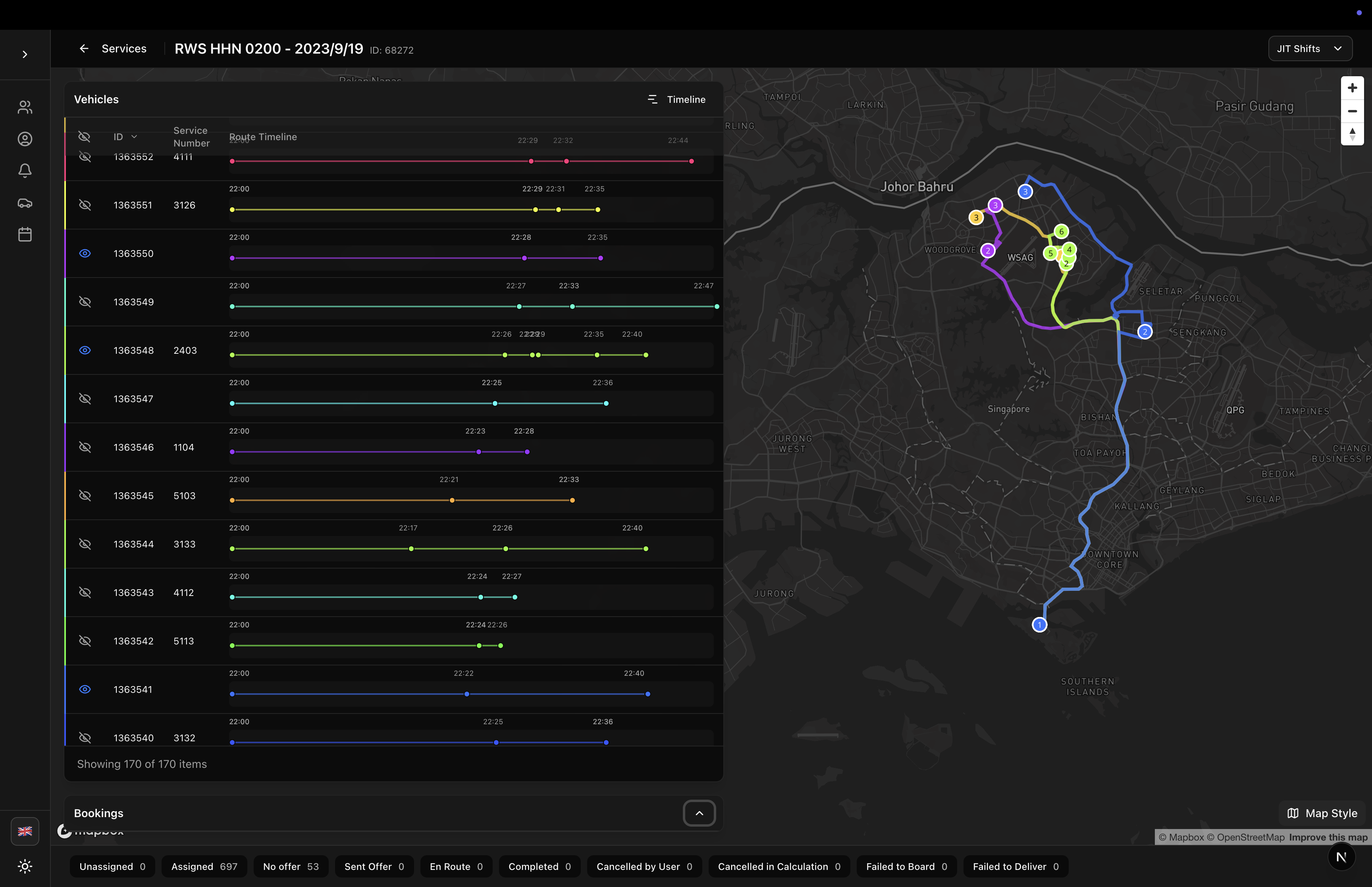
Complete simulation detail page with vehicle routes, timeline visualization, and booking management
SimulationDetailPage
A comprehensive simulation detail page component that provides vehicle route visualization, timeline view, booking management, and JIT shift filtering. This is a production-ready page for transportation simulation management.
Features
- Interactive Map: Display vehicle routes on Mapbox with route polylines and waypoints
- Vehicle Table: List of vehicles with booking statistics, mileage, and travel time
- Timeline View: Horizontal gantt-style timeline showing vehicle schedules
- Route Details Panel: Detailed waypoint list with times and locations
- Bookings Table: Collapsible booking list with filtering and sorting
- JIT Shift Filter: Filter vehicles and bookings by departure shifts
- State Distribution: Visual booking state statistics with filter buttons
- Map Toggle: Show/hide individual vehicle routes with eye icons
- Responsive Layout: Adaptive 40-60 split when route details are open
- Localization: Fully localized in English and Japanese
Usage
// app/simulations/[id]/page.tsx
'use client'

import { useParams } from 'next/navigation';
import { SimulationDetailPage } from '@/components/sgerp/pages/simulation-detail-page';

export default function Page() {
  const params = useParams();
  const simulationId = params.id as string;

  return <SimulationDetailPage simulationId={simulationId} />;
}
Props
| Prop | Type | Default | Required | Description |
|---|---|---|---|---|
simulationId | string | - | Yes | The ID of the simulation to display |
Screenshots
Map with All Routes
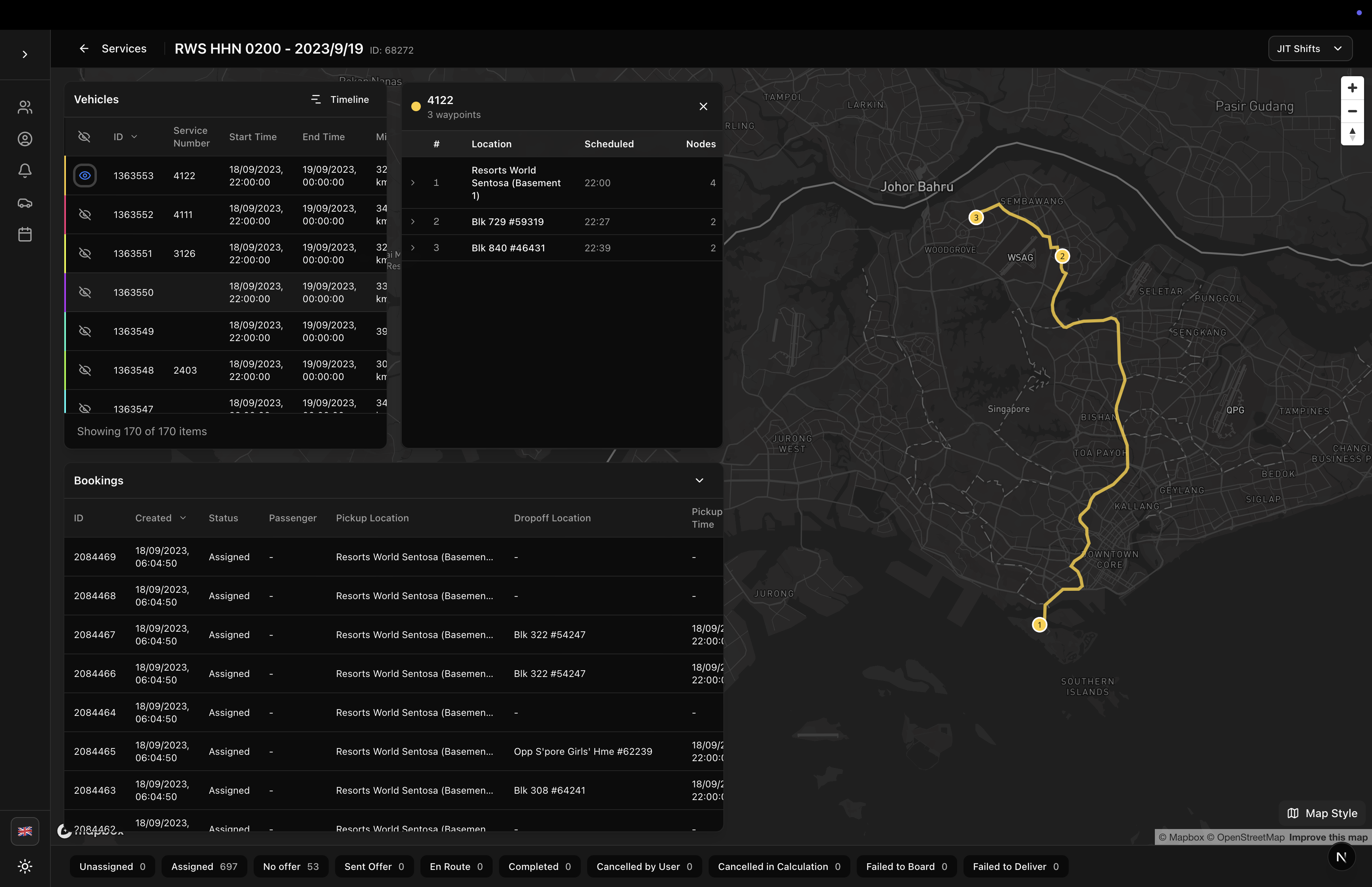
Map with Single Route
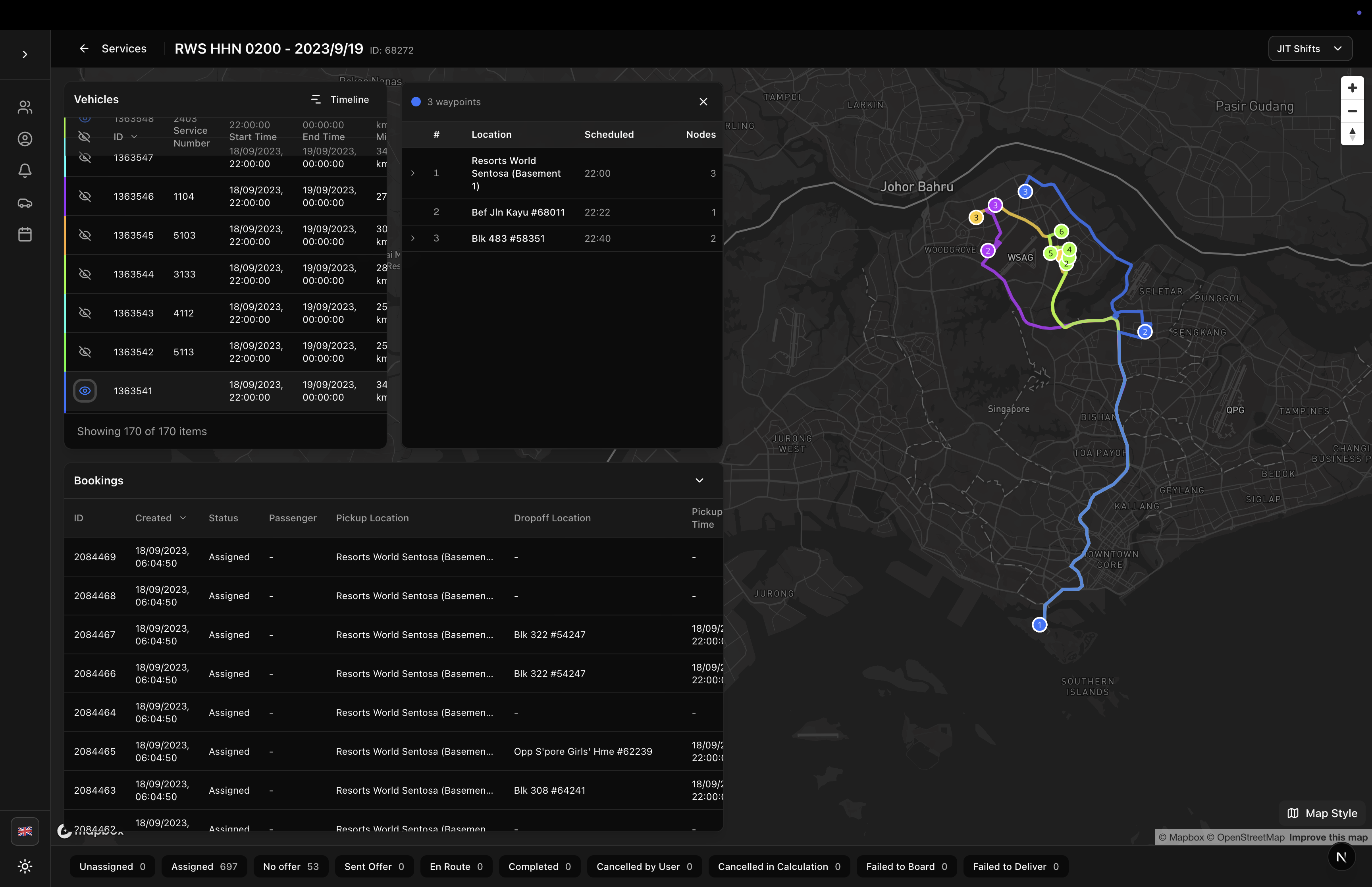
Map with Multiple Routes
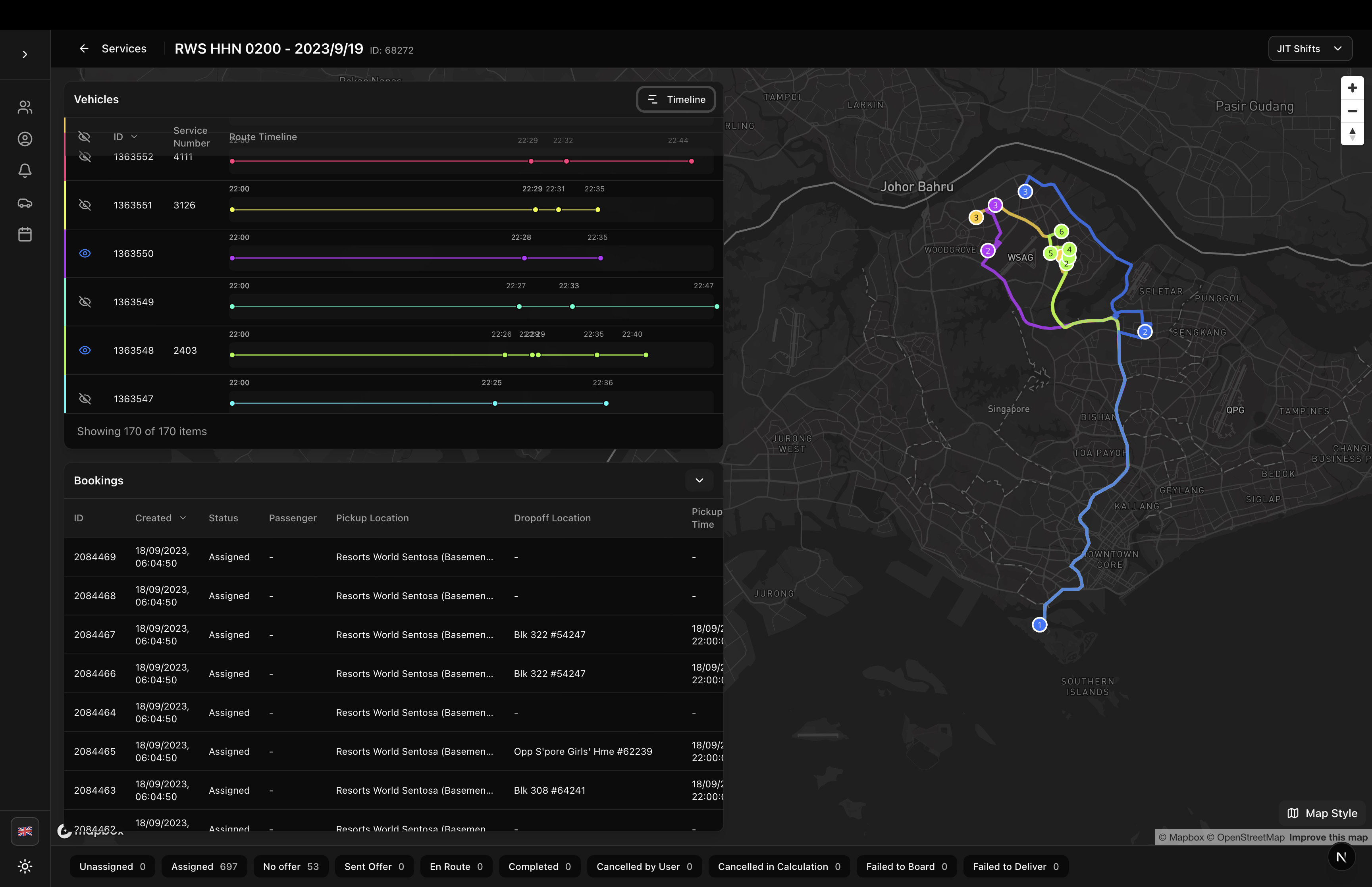
Timeline View
Timeline Full Height
Features in Detail
Vehicle Route Visualization
- All Routes Toggle: Button to show/hide all routes at once
- Individual Route Toggle: Eye icon on each vehicle row to show/hide specific routes
- Route Details Panel: Click a vehicle row to open detailed waypoint list (40-60 split)
- Waypoint Navigation: Click waypoints to pan map to that location
- Route Polylines: OSRM-calculated routes displayed as blue lines
- Mileage & Travel Time: Calculated from route legs and displayed in columns
Timeline Mode
- Horizontal Gantt: Shows vehicle schedules as horizontal bars
- Time Range: Auto-calculated from all scheduled nodes
- Node Visualization: Pickup (green) and dropoff (red) markers on timeline
- Full Height: Collapse bookings table to maximize timeline view
- Click to Pan: Click timeline nodes to pan map to location
Booking Management
- Collapsible Table: Chevron button to collapse/expand bookings
- State Filtering: Click state badges in footer to filter bookings
- JIT Shift Filtering: Dropdown to filter by departure shift
- Driver & Vehicle Info: Shows assigned vehicle and driver for each booking
- Passenger Info: Displays passenger username from booking data
- Sortable Columns: Sort by ID, date, status, pickup time, etc.
JIT Shift Support
- Shift Dropdown: Select departure shift to filter vehicles and bookings
- Shift Statistics: Shows booking count, vehicles allocated, and assigned
- Home-to-Work / Work-to-Home: Supports both shift types
- Time Matching: Matches bookings by min_pickup_time or max_dropoff_time
State Distribution
- Visual Statistics: Booking counts by state (unassigned, assigned, enroute, etc.)
- Click to Filter: Click state badges to filter booking table
- Combined States: "Unassigned" combines NEW, QUEUED, PREPARED, CALCULATION
- Real-time Updates: Updates as bookings change state
Layout Structure
Header
- Back Button: Navigate to services list
- Simulation Info: Name and ID
- Loading Indicator: Spinner when fetching data
- JIT Shift Selector: Dropdown for shift filtering (if available)
Map Area (Full Screen)
- Vehicle Route Map: Mapbox GL JS with routes and waypoints
- Left Overlay: Tables and panels (50% width)
- Vehicles Section: Table with booking stats (expandable)
- Toggle between regular and timeline mode
- Route details panel appears when vehicle selected
- Bookings Section: Collapsible table
- Expand/collapse with chevron button
- When collapsed, vehicles take 100% height
- Vehicles Section: Table with booking stats (expandable)
Footer
- State Distribution: Clickable badges showing booking counts by state
- Filter Indicator: Selected states are highlighted
Data Flow
The component uses the simulation logic utilities from sgerplib/sgerp/simulation-logic:
1. Fetch Data
import { fetchSimulationData } from '@/sgerplib/sgerp/simulation-logic';

const { bookings, nodes } = await fetchSimulationData(api, simulationId);
2. Build References
import { attachReferences } from '@/sgerplib/sgerp/simulation-logic';

attachReferences(bookings, vehicles, nodes);
3. Generate Routes
import { createVehicleRoutesFromNodes } from '@/sgerplib/sgerp/utils/routeUtils';

const routes = createVehicleRoutesFromNodes(nodes, vehicleIds);
4. Calculate OSRM Routes
Uses RoutingEngine to calculate polylines from waypoints for map display.
Vehicle Table Columns
Regular Mode
- Map Toggle: Eye icon to show/hide route
- ID: Vehicle ID
- Service Number: Vehicle identifier
- Start Time: Shift start time
- End Time: Shift end time
- Mileage: Total route distance in km
- Travel Time: Total route duration (hours + minutes)
- Bookings Total: Total assigned bookings
- Bookings Assigned: Bookings in ASSIGNED state
- Bookings Enroute: Bookings in ENROUTE state
- Bookings Completed: Bookings in COMPLETED state
Timeline Mode
- Map Toggle: Eye icon to show/hide route
- ID: Vehicle ID
- Service Number: Vehicle identifier
- Route Timeline: Horizontal gantt chart with pickup/dropoff nodes
Bookings Table Columns
- ID: Booking ID
- Created: Booking creation time
- Status: Booking state (localized)
- Passenger: Username from booking data
- Pickup Location: Pickup location name (truncated)
- Dropoff Location: Dropoff location name (truncated)
- Pickup Time: Scheduled pickup time from nodes
- Vehicle: Assigned vehicle service number
- Driver: Driver first and last name
- Demand: Passenger count and special requirements
Localization
Uses localization keys from sgerplib/locales/:
Page Keys
ptapp.simulation.vehicles- Vehicles section headerptapp.simulation.bookings- Bookings section headerptapp.nav.services- Back button textcommon.timeline- Timeline button textcommon.loading- Loading indicatorcommon.no_data- Empty statecommon.no_route- No route available
Column Keys
column.id,column.service_number,column.start_time, etc.column.mileage,column.travel_timecolumn.bookings_total,column.bookings_assigned, etc.column.pickup_location,column.dropoff_locationcolumn.vehicle,column.driver,column.passenger
State Keys
booking_state.new,booking_state.assigned, etc.booking_state.unassigned- Combined unassigned states
Styling
The component uses:
- Tailwind CSS for all styling
- Backdrop Blur: Semi-transparent panels over map
- Flexbox Layout: Responsive splits and overflow handling
- Border Accents: Vehicle color on left border of rows
- Sticky Headers: Table headers stay visible when scrolling
Required CSS
- Tailwind CSS configured
- Mapbox GL JS CSS imported
- shadcn/ui button and select components
Performance Optimizations
- Client-Side Only Tables: Tables don't make API calls, only render collection data
- Only Fields: Fetches only required fields from API
- Memoized Calculations: Statistics and filters use
useMemo - Reference Building: Efficient index maps for O(1) lookups
- Lazy Route Calculation: OSRM routes calculated in parallel
Dependencies
Required packages:
next(for routing)react(18+)mapbox-gl(for map display)lucide-react(for icons)sgerp-frontend-lib(collections, hooks, utilities)
Components used:
VehicleTablefrom sgerp-frontend-libVehicleRouteMapfrom sgerp-frontend-libRouteDetailsTablefrom sgerp-frontend-libInlineTimelinefrom sgerp-frontend-libJitShiftDropdownfrom sgerp-frontend-libDemandCellandDemandProviderfrom sgerp-frontend-lib@/components/ui/button,@/components/ui/select(shadcn/ui)
Related Components
- VehicleTable - Reusable vehicle table
- VehicleRouteMap - Map component
- ServicesPage - Services list page
- TemplatesPage - Templates list page
Notes
- SGERP Context: Requires
SGERPProviderwrapper in app layout - Mapbox Token: Requires Mapbox access token configured
- Driver Data: Driver names attached separately (not included in initial fetch)
- Mobile Support: Best viewed on desktop/tablet due to complexity
- State Persistence: Map view and selected routes don't persist on navigation